Introduction to Computer and components of a computer system
A computer is a programmable electronic device that accepts raw data as input, processes it according to a set of stored instructions, produces useful information as output, and can store the results for future use.
Notes
Introduction to Computer
A computer is a programmable electronic device that accepts raw data as input, processes it according to a set of stored instructions, produces useful information as output, and can store the results for future use.
A computer takes input, works on that data, gives us an output, and can store the result.
What is a Computer?
A computer is an electronic device used to process data. It works according to instructions given through a program. It can perform arithmetic and logical operations quickly and accurately.
Modern computers are programmable and can be used for many different types of work. They are not limited to calculations; they can also store information, communicate with other devices, and run different applications.
Basic Working of a Computer
The basic working of a computer can be understood through four main stages: Input, Processing, Output, and Storage.
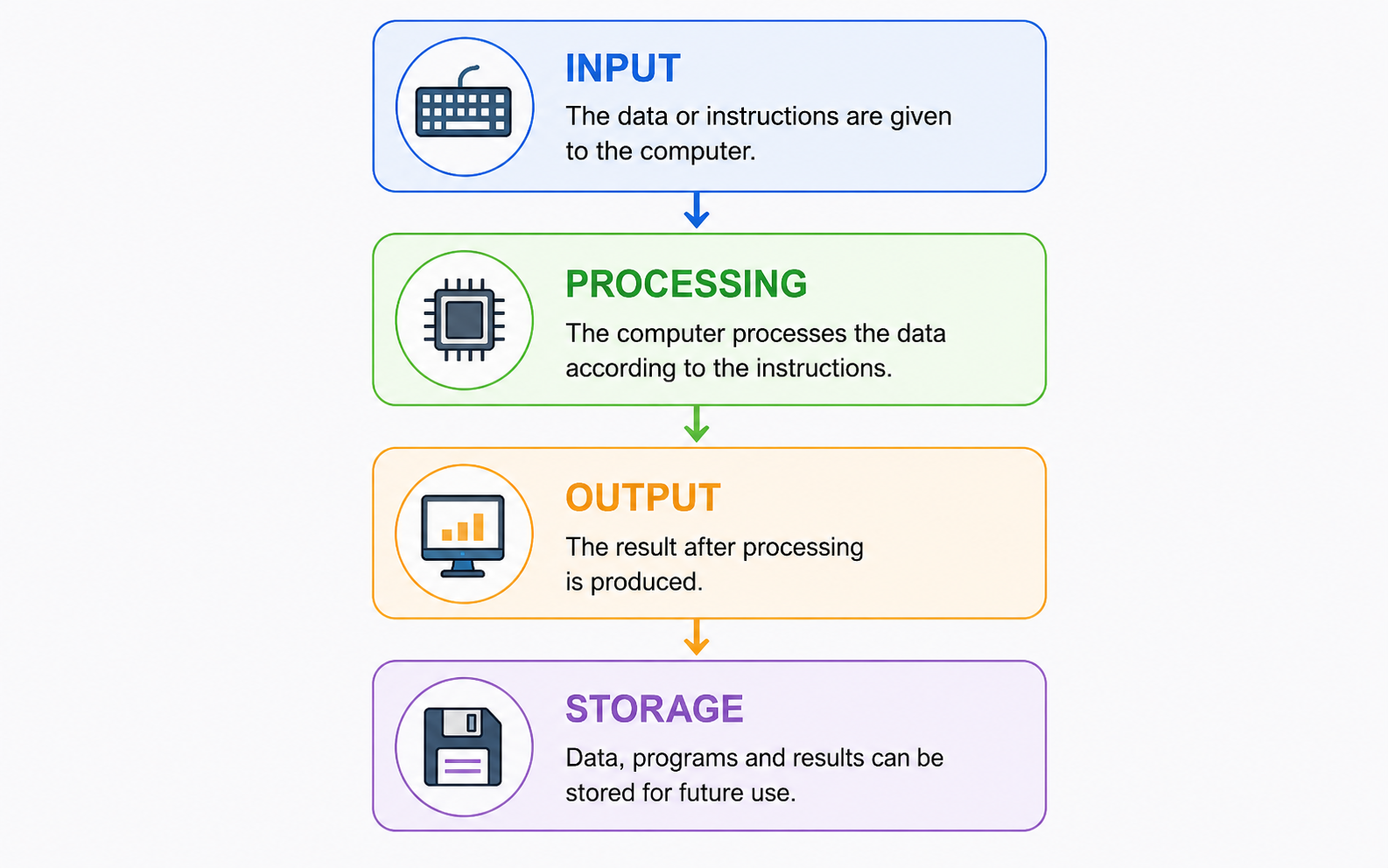
1. Input
Input is the data or instructions given to the computer. Devices such as a keyboard and mouse are commonly used to provide input.
2. Processing
After receiving the input, the computer processes the data according to the instructions provided by the program.
3. Output
The result obtained after processing is called output. The result may be displayed on a monitor, printed on paper, or produced through another output device.
4. Storage
Data, programs, and results can be stored so that they can be used later.
A computer first receives data as Input, processes it, produces the Output, and stores the data or result for future use.
Characteristics of Computers
Computers have several characteristics that make them useful for solving problems and performing different tasks.
Speed
A computer can perform a very large number of operations in a short period of time.
Accuracy
A computer can give highly accurate results when the input and program instructions are correct.
Diligence
A computer does not become tired or lose concentration. It can perform the same task repeatedly without getting tired.
Versatility
A computer can be used for many different activities such as calculations, programming, designing, communication, and data processing.
Storage Capacity
A computer can store a large amount of data and information for future use.
Automation
Once a program or task is started with the required instructions, the computer can perform the operations automatically.
Evolution of Computers
Computers have developed gradually from simple calculating devices into modern electronic and programmable machines.
| Device / Development | Important Point |
|---|---|
| Abacus | An early manual calculating device. |
| Pascaline | A mechanical calculator developed by Blaise Pascal. |
| Analytical Engine | Charles Babbage's important general-purpose computer concept. |
| ENIAC | An early electronic general-purpose computer. |
| Microprocessor | Microprocessor-based systems helped in the development of modern personal computers. |
Generations of Computers
Computers are commonly divided into generations according to the major technology used in their development.
| Generation | Main Technology | Example |
|---|---|---|
| First Generation | Vacuum Tubes | ENIAC, UNIVAC |
| Second Generation | Transistors | IBM 1401 |
| Third Generation | Integrated Circuits (ICs) | IBM 360 |
| Fourth Generation | Microprocessors | Personal Computers |
| Fifth Generation | AI and advanced processing technologies | AI and robotics-oriented systems |
Classification of Computers
Computers can be classified in different ways depending on their size, purpose, and working principle.
According to Size
- Microcomputers
- Minicomputers
- Mainframe Computers
- Supercomputers
According to Purpose
- General-Purpose Computers
- Special-Purpose Computers
According to Working Principle
- Analog Computers
- Digital Computers
- Hybrid Computers
Applications of Computers
Computers are used in almost every field of modern life.
- Education: Online learning, digital libraries, virtual labs and examinations.
- Business: Accounting, payroll, inventory and data analysis.
- Banking: ATMs, online banking and digital payments.
- Healthcare: Medical imaging, digital records and computer-assisted systems.
- Communication: Email, messaging and video calls.
- Entertainment: Games, movies, animation and digital media.
- Science: Research, simulations and data analysis.
Advantages and Limitations of Computers
| Advantages | Limitations |
|---|---|
| High speed | No human-like intelligence |
| High accuracy when input and instructions are correct | Depends on programs and correct input |
| Large storage capacity | Requires electrical power |
| Continuous working without fatigue | Follows the GIGO principle |
| Automation and versatility | Improper use may create health and social concerns |
Role of Computers in Modern Society
Computers have become an important part of modern society. They are used in communication, healthcare, education, governance, entertainment, science, banking, and many other areas.
Digital services, online education, communication platforms, medical systems, research, and many everyday activities depend on computer technology.
Emerging Trends in Computing
Modern computing is developing rapidly. Important trends mentioned in the study material include:
- Artificial Intelligence (AI)
- Machine Learning (ML)
- Cloud Computing
- Internet of Things (IoT)
- Quantum Computing
- Blockchain
- 5G and 6G technologies
- Edge Computing
- Augmented Reality
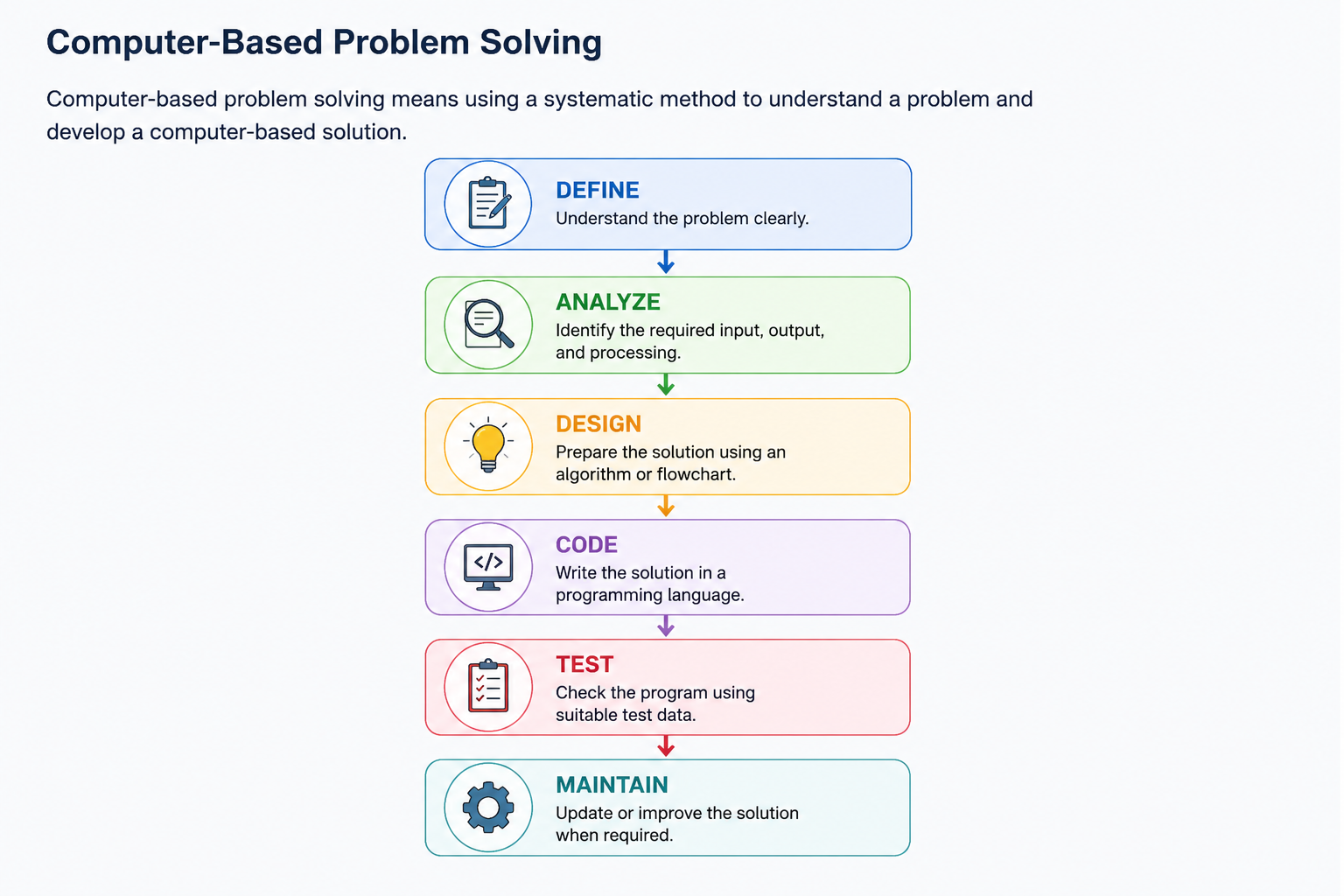
Before writing a program, first understand the problem, decide the solution, write the code, test it, and improve it when required.
- Define: Understand the problem clearly.
- Analyze: Identify the required input, output, and processing.
- Design: Prepare the solution using an algorithm or flowchart.
- Code: Write the solution in a programming language.
- Test: Check the program using suitable test data.
- Maintain: Update or improve the solution when required.
Before writing a program, first understand the problem, decide the solution, and then write and test the code.
Important Exam Questions
Short Answer Questions
- What is a computer?
- What is the IPO cycle?
- Write any four characteristics of a computer.
- What is meant by GIGO?
- Write the basic stages of computer working.
- What are the different generations of computers?
- Write the classification of computers according to working principle.
- Write any four applications of computers.
Long Answer Questions
- Explain the basic working of a computer with the help of the IPO cycle.
- Explain the important characteristics of computers.
- Explain the evolution and generations of computers.
- Explain the classification of computers with suitable examples.
- Discuss the advantages and limitations of computers.
- Explain the role and applications of computers in modern society.
After reading the topic, watch an easy introductory lecture to strengthen your understanding.
A short handwritten-style revision sheet for this topic is covered in the study notes above.
Use the mind map for quick revision before class tests and examinations.
Components of a Computer System
A computer system is made up of several important components that work together to accept data, process it, store it, and produce useful information.
A computer system is not just a CPU. Input devices, CPU, memory, storage, and output devices all work together to complete a task.
Functional Components of a Computer System
A computer system has four main functional components: Input Unit, Central Processing Unit (CPU), Memory Unit, and Output Unit.
| Component | Main Function |
|---|---|
| Input Unit | Accepts data and instructions from the user. |
| CPU | Processes data and controls the operations of the computer. |
| Memory Unit | Stores data, instructions, and results. |
| Output Unit | Presents the processed information to the user. |
1. Input Unit
The Input Unit is used to enter data and instructions into the computer. It receives information from the user and sends it to the computer for processing.
Input devices convert user-provided information into a form that the computer system can process.
Input means giving data to the computer. For example, when you type your name using a keyboard, the keyboard provides input to the computer.
Common Input Devices
- Keyboard: Used for entering text, numbers, and commands.
- Mouse: Used for pointing, selecting, clicking, and interacting with graphical interfaces.
- Scanner: Converts printed documents and images into digital form.
- Microphone: Used to provide audio or voice input.
- Webcam: Used to provide video input.
Input Devices Table
| Device | Input Type | Common Use |
|---|---|---|
| Keyboard | Text and commands | Typing and coding |
| Mouse | Pointing | GUI interaction |
| Scanner | Images and documents | Digitization |
| Microphone | Audio | Voice input |
| Webcam | Video | Video calls and recording |
2. Central Processing Unit (CPU)
The Central Processing Unit (CPU) is the main processing unit of a computer. It executes instructions and controls the operations of the computer system.
The CPU fetches instructions from memory, decodes them, performs the required operation, and stores the result.
The CPU is often called the brain of the computer because it performs processing and controls the main operations of the system.
Main Parts of CPU
The CPU mainly consists of:
- Arithmetic Logic Unit (ALU)
- Control Unit (CU)
- Registers
3. Arithmetic Logic Unit (ALU)
The Arithmetic Logic Unit (ALU) is the part of the CPU responsible for arithmetic and logical operations.
Arithmetic Operations
- Addition
- Subtraction
- Multiplication
- Division
Logical Operations
- AND
- OR
- NOT
- XOR
- Comparison
| Type | Operations |
|---|---|
| Arithmetic | Addition, Subtraction, Multiplication, Division |
| Logical | AND, OR, NOT, XOR, Comparison |
The ALU performs calculations and logical comparisons. For example, when the computer calculates 5 + 7 = 12, the arithmetic operation is performed by the ALU.
4. Control Unit (CU)
The Control Unit (CU) manages and coordinates the activities of the computer. It controls the flow of data and instructions between the CPU, memory, and input/output devices.
The Control Unit fetches instructions from memory, decodes them, and generates the required control signals for their execution.
Main Functions of Control Unit
- Fetch: Gets the required instruction from memory.
- Decode: Interprets the instruction.
- Execute: Sends appropriate control signals to the required units.
The Control Unit controls and coordinates computer operations. It does not perform the actual arithmetic calculations itself.
5. Memory Unit
The Memory Unit stores data, instructions, and results required by the computer. It provides information to the CPU during processing and stores results when required.
Computer memory is organized into different levels according to speed, size, and cost.
Memory is the computer's storage area for the data and instructions that are being used or saved.
6. Primary Memory
Primary Memory, also called Main Memory, is directly accessed by the CPU. It stores programs and data that are currently being used by the computer.
Important types of primary memory include RAM, ROM, and cache memory.
| Type | Volatile | Main Use |
|---|---|---|
| RAM | Yes | Stores currently running programs and data |
| ROM | No | Stores firmware and boot-related instructions |
| Cache | Yes | Provides faster access to frequently needed data |
RAM — Random Access Memory
RAM is temporary, read/write memory used to store the data and programs currently required by the computer.
RAM is volatile, which means the stored data is lost when the power is turned off.
ROM — Read Only Memory
ROM is non-volatile memory that retains its contents even when the computer is switched off. It is used for firmware and boot-related instructions.
Cache Memory
Cache is a high-speed memory located close to or inside the CPU. It helps reduce the time required to access frequently used data.
7. Secondary Storage
Secondary storage provides permanent, non-volatile storage for programs, data, and other files.
Compared with primary memory, secondary storage generally provides larger capacity and is slower to access.
Examples of Secondary Storage
- Hard Disk Drive (HDD)
- Solid State Drive (SSD)
- CD/DVD
- Pen Drive
- Cloud Storage
| Storage Device | Type | Important Point |
|---|---|---|
| HDD | Magnetic | Large capacity, mechanical storage |
| SSD | Flash | Faster storage with no moving mechanical parts |
| Pen Drive | Flash | Portable storage device |
| CD/DVD | Optical | Optical storage media |
8. Registers
Registers are very small and very fast storage locations inside the CPU. They temporarily hold data, instructions, addresses, and intermediate results during processing.
Common Registers
| Register | Purpose |
|---|---|
| PC — Program Counter | Holds the address of the next instruction. |
| IR — Instruction Register | Holds the current instruction. |
| ACC — Accumulator | Stores results produced by ALU operations. |
| MAR — Memory Address Register | Holds the memory address being accessed. |
| MDR — Memory Data Register | Holds data being transferred to or from memory. |
Registers are among the fastest storage locations in the computer and are located inside the CPU.
9. Output Unit
The Output Unit presents the processed information to the user in a form that can be understood by humans.
Common Output Devices
- Monitor: Displays text, graphics, and video.
- Printer: Produces printed output on paper.
- Speakers: Produce audio output.
- Projector: Displays computer output on a larger screen.
| Device | Output | Copy Type |
|---|---|---|
| Monitor | Text, graphics, video | Soft Copy |
| Printer | Text and images | Hard Copy |
| Speakers | Sound and music | Soft Copy |
| Projector | Large-screen display | Soft Copy |
10. Data Processing Cycle
The Data Processing Cycle describes the basic sequence followed by the CPU while processing an instruction.

- Fetch: The required instruction is obtained from memory.
- Decode: The Control Unit interprets the instruction.
- Execute: The required operation is performed.
- Store: The result is stored in a register or memory.
11. Input-Process-Output Model
The IPO model explains how a computer receives data, processes it, and produces useful information. Memory supports the processing by storing data and instructions.

Example: Adding Two Numbers
| Stage | Action |
|---|---|
| Input | Enter 5 and 7 using the keyboard. |
| Process | CPU/ALU performs 5 + 7 = 12. |
| Output | Display 12 on the monitor. |
| Storage | Data and result can be stored in memory. |
12. Hardware Organization
Hardware organization describes how the different hardware components of a computer are connected and communicate with each other.
The main communication path between CPU, memory, and input/output devices is the system bus.
Types of System Bus
| Bus | Function |
|---|---|
| Data Bus | Carries data between computer components. |
| Address Bus | Carries memory or I/O addresses. |
| Control Bus | Carries control and timing signals. |
Think of the system bus as a communication pathway that allows different parts of the computer to exchange information.
13. Interaction Among Computer Components
The different components of a computer work together during processing. Input devices provide data, memory holds data and instructions, the CPU processes them, and output devices present the result.
The Control Unit coordinates the flow of information between the different units. Buses carry data, addresses, and control signals.
14. Memory Hierarchy
Computer memory is organized according to speed, size, and cost. Faster memory is generally smaller and placed closer to the CPU.
| Level | Typical Characteristic |
|---|---|
| Registers | Very fast and located inside the CPU. |
| Cache | Very fast memory used to reduce access time. |
| RAM | Main working memory for active programs and data. |
| SSD | Non-volatile secondary storage. |
| HDD | High-capacity magnetic secondary storage. |
15. System Performance Factors
The performance of a computer system depends on several hardware and software factors.
- CPU Clock Speed: Affects how quickly instructions can be processed.
- Number of CPU Cores: Multiple cores can support parallel processing.
- Cache: Faster access to frequently required data can improve performance.
- RAM: More memory allows more programs and data to remain available during processing.
- Storage: SSD storage generally provides faster access than traditional HDD storage.
- Bus Width: Affects how much information can be transferred through the bus.
Quick Revision
| Component | Remember This |
|---|---|
| Input Unit | Accepts data and instructions. |
| CPU | Processes instructions and controls operations. |
| ALU | Performs arithmetic and logical operations. |
| Control Unit | Controls and coordinates operations. |
| Memory | Stores data, instructions, and results. |
| Registers | Very fast temporary storage inside CPU. |
| Output Unit | Presents processed information. |
| Storage | Provides long-term data storage. |
Remember the basic flow: Input → Processing → Output, while Memory and Storage support the process.
Important Exam Questions
Short Answer Questions
- What are the main functional components of a computer system?
- What is an Input Unit?
- Write any five input devices.
- What is the CPU?
- What are the main parts of CPU?
- What is ALU?
- What is the function of the Control Unit?
- What is primary memory?
- What is the difference between RAM and ROM?
- What is secondary storage?
- What are registers?
- What is the IPO model?
- What is a system bus?
- Name the three types of system bus.
Long Answer Questions
- Explain the functional components of a computer system with a suitable diagram.
- Explain the Input Unit and different input devices.
- Explain the CPU and its main components.
- Explain the functions of ALU and Control Unit.
- Explain primary memory and secondary storage with suitable examples.
- Explain different registers and their functions.
- Explain the Data Processing Cycle.
- Explain the Input-Process-Output model with an example.
- Explain the different types of system bus.
- Explain how the different components of a computer interact with one another.
After reading the topic, watch this easy explanation of computer components, CPU, memory, input and output devices.
A short handwritten-style revision sheet covering the major components of a computer system is covered in the study notes above.
Use the mind map for quick revision of Input Unit, CPU, Memory, Storage and Output Unit.